
The other day, Mario forced me (literally) to install the game Frets on Fire on my computer, which he said was very good. I was reluctant: “Playing a game that is designed to be played with a guitar with the keyboard? It doesn’t convince me.” But he insisted that it was exactly the same as playing with the guitar in Guitar Hero. So, said and done, I downloaded the game and a couple of song packs from Guitar Hero I and II.
Mario was right. The truth is that holding the keyboard in your arms, putting your fingers on the “efes” to simulate plucking the strings and the “enter” key to make scratches (I don’t know if these things are called that, may someone in the know correct me).

Frets on Fire is fine for what it is and can be played perfectly (except for some errors when the game goes crazy), but the graphics are quite disappointing, as is the menu.
So after a little searching on the internet, I found the “almost” perfect conversion of Guitar Hero for PC: Guitar Zero. This one has practically the same interface as the original Guitar Hero, with the same song menu (the one in Frets on Fire is a bit tacky) and with exactly the same score while playing. However, Frets on Fire works on Linux quite well (I tested it on Ubuntu Feisty and I think it works better than on Windows.
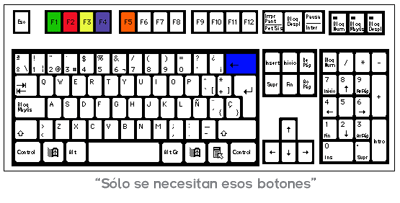
The only drawback it has compared to Frets on Fire is that it only works with gamepads and guitars and, if we want to play with the keyboard we have to use PPJoy to create a virtual gamepad, a task that can put many people off.
Below I explain how to configure and use PPJoy, as well as some links of interest to download the programs and songs.
 - Antes de instalar el ppjoy, hacer click con el boton derecho en MiPC–>Propiedades–>Pestaña Hardware–>Firma de controladores–>Seleccionar “Ninguna” o “Advertir”
- Install ppjoy and click “Yes” or “Accept” to everything it asks
- After installation go to the Start menu–>All programs–>Parallel Port Joystick–>Configure Joysticks
- Select all those that are installed and delete them with the remove button.
- Select the Add button, in the Parallel Port dialog, select Virtual Joysticks, select Add.
- The dialog will open to configure new hardware, click on “next” or “continue” or “accept” everything it asks you, then another similar wizard will open and do the same (accept, etc.)
- Now select the created PPJoy Virtual Joystick and click on Mapping, in the three options below select “Set a custom mapping fot this controller” then click on next.
- Another dialog opens, where it says “Axes” you select 4, where it says “Buttons” you select 10 and where it says “POVHats” you select 2, then click on next until finished without moving anything, then click on Done.
- Go to the Start menu–>All Programs–>Parallel Port Joystick–>PPJoyKey, select the created virtual joystick and configure the buttons according to your liking, but only up to “button 10” and do not close that window. (You can also upload my configuration file so you don’t have to configure it manually)
- Without closing the previous window, enter Guitar Zero and play it with the button configuration that you have chosen, it worked perfectly for me and it hasn’t given me any problems.
Links of interest:
-
Frets on Fire:
- Frets on Fire Hispanic Community: Download the program and many songs
### Guitar Zero:
- Stepmanía MEDIA: Page with all the songs from Guitar Hero I & II, the program, the PPJoy and some song backgrounds.
- PPJoy and Guitar Zero configuration file: (config.dat and PPJoy-GuitarZero.ini) Use them if you don’t want to manually configure the buttons yourself.
Comments are provided by Disqus. When you load them, Disqus may use cookies and process data such as your IP address.
Disqus privacy policy