
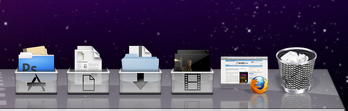
 Una de las últimas novedades que trajo Mac OS X (a long, long time ago) fue la de incorporar pilas o stacks en el dock (la barra de aplicaciones de Mac). Pese a lucir bastante bien por defecto, existe una manera de poner un icono en los stacks para que quede más vistoso todavía y dé una impresión más de carpeta o archivador. Podéis ver un ejemplo en la imagen que acompaña este texto.
Doing it is not difficult. Basically it consists of putting an image inside the corresponding folder so that it simulates that it is an icon. To do this we must take two things into account, on the one hand, the name of the image, and on the other the date of modification, since when adding new files to the folder they can be placed on the front page and ruin the invention.
As it may seem a bit confusing, we are going to go in parts. First of all, we must download a set of icons to put in our stacks. A couple of quite interesting options are on this page (don’t be scared, although it is in Japanese, the download link is in English).
Once downloaded, and after deciding the folder to which we want to edit the stack (For example, Downloads, Movies, etc.) we will have to create a file within it with the modification date in the future, so that if we decided to show the files in the folder according to their modification date, the file would continue to be shown at the beginning of the list.
To do this, we will use the following commands from the terminal: [text] cd ~/Downloads
touch -mt 202001010101.01 ” Downloads “ [/text] In this case, we are creating a file called “ Downloads “ (with a space before and after to appear at the top of the list if the folder is sorted by name) with a modification date of 2020.
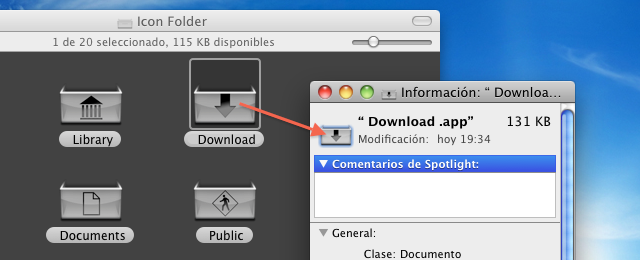
Once the file is created, we will right click on it and select “Get Information”. Once there, we will drag the image that we want to place presiding over the stack to the icon that appears in the upper left part of the file information window. Once this is done, we will have the icon installed and we will only have to repeat the process for the others simply by changing the folder.
Comments are provided by Disqus. When you load them, Disqus may use cookies and process data such as your IP address.
Disqus privacy policy