
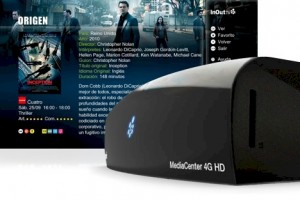
 Hoy en día, para muchos jóvenes (entre los que me incluyo) el concepto de televisión es sieplemente el de ser la pantalla grande a la que conectamos la consola para jugar, o el ordenador o disco duro multimedia para ver películas. Conscientes de ello, en la empresa española InOut, ha desarrollado el InOut Mediacenter 4G HD, un pequeño aparato lleno de posibilidades: ver TDT HD, TDT a la carta, grabar lo que emiten en la tele, utilizarlo como mediacenter conectándolo a la red de nuestra casa o una serie de servicios “Premium” que detallaré más adelante.
Features: Hardware
Rear
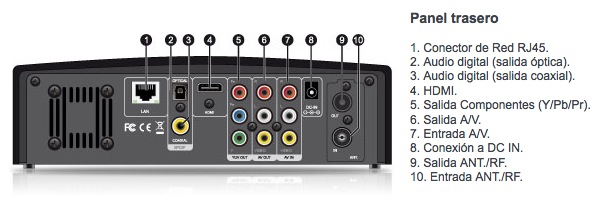 El Mediacenter 4G HD debe conectarse a la televisión, a nuestro router y a la toma de antena. Como se puede ver en la imagen superior, la compatibilidad con televisores, tanto nuevos como antiguos, es muy alta puesto que se puede conectar por HDMI, Componentes o A/V. También dispone de una entrada A/V.
The connection to the router is made through the standard RJ45 cable, although it also has a Wifi N USB antenna that connects to the ports on the side. As for the antenna connection, it is both input and output, so it can be connected to other devices that require an antenna socket as a “bridge”.
As for audio, in addition to the usual stereo outputs, it has an optical output and another coaxial.
The noise of the fan and the hard drive is only noticeable if the room is completely silent, but not if we are watching TV.
Side
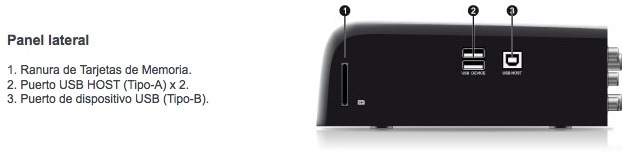
On the side it has a slot for SD cards, two USB and a third to connect to the computer.
Front
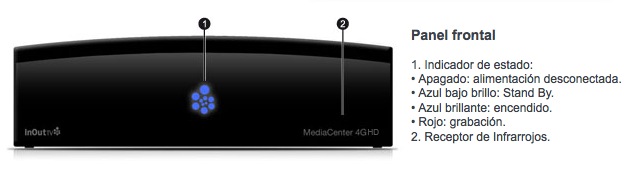 En el frontal tiene una luz que indica el estado del dispositivo: en azul brillante indica que está funcionando, en azul suave que está en stand-by y en rojo que alguna de las dos sintonizadoras está grabando.
Controls: QWERTY and normal
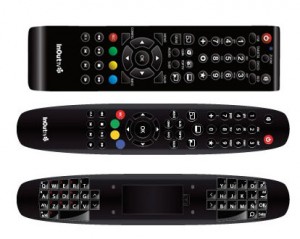 La versión “Full Equiped” que estoy analizando trae un mando a distancia especial que en la parte de detrás dispone de un teclado QWERTY, pensado sobre todo para escribir en páginas web (el MC4G dispone del navegador Opera instalado en su sistema operativo). Sin embargo, considero que este mando es uno de los puntos débiles del aparato por varios motivos: para empezar, el tamaño del mando es muy grande y muy poco ergonómico, y en lo personal, me resulta incómodo.
The second problem, which limits both the possibilities of the QWERTY and normal controls, is that the infrared ones are extremely directional. That is to say, if you want to press a button and have it recognized by the device, you must point it directly at it, and when I say directly, it is directly: if you deviate a little, it will not detect it. Taking this into account, the QWERTY controller is affected in a double way, since if we use it as a keyboard we will have to take great care of the position in which we write and the inclination of the controller, since at the slightest we will stop writing.
Features: Software and Compatibility
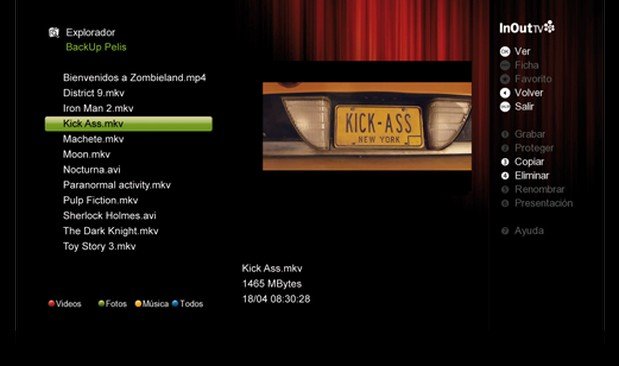
Files
The Inout Mediacenter 4G HD, apart from watching television in HD, allows you to do many other things, but the one that currently seems to me the most interesting of all, given the use I give it, is to watch movies and series on the computer through LAN. The file compatibility it offers is very high and is not limited only to video:
- Video: AVI, MKV, TS, TP, TRP, M2TS, MPG, MP4, MOV, M4V, VOB, ISO, IFO, DAT, WMV, ASF, RM, RMVB, FLV
- Subtitles: SRT, SMI, SSA, ASS, IDX/SUB, SUB
- Image: HD JPEG, BMP, GIF, TIF, PNG
- Audio: MP3, OGG, WMA, WAV, AAC, FLAC
Subtitles are detected, as usual, if both the video and subtitle files have the same name and are quite customizable: you can set the size, separation from the borders, color and font.
As for the supported resolutions, they reach 1080p at 24fps without problems, so in short, it will be very difficult to have a file that is not compatible.
Grid
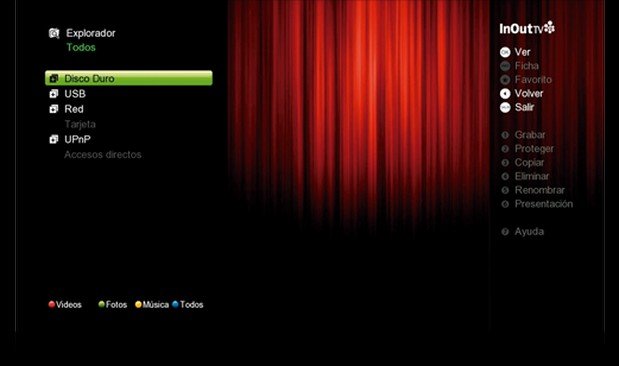 Para las conexiones en red utiliza Samba (SMB) en una versión que intuyo debe ser antigua (parecida a la que utiliza Windows XP). Esto, lejos de ser un problema, es algo bueno para la gente que, como yo, somos usuarios de Mac, puesto que se traduce en que el dispositivo aparece automáticamente en la barra lateral del Finder sin hacer nada y se puede acceder directamente a los contenidos del disco duro (por ejemplo, a las grabaciones que hayamos hecho).
Recordings
The recordings you make are saved in the standard DTT format, that is, in .TS. This format is very easy to convert to more common ones, such as AVI, MP4 or MKV. I have tried to do it with one of the most well-known and free Mac programs, Handbrake, without any type of problem or incompatibility.
Features that make it “special”
Up to this point I have talked about everything that could be attributed to a DTT HD Recorder + Mediacenter, but the MC4G HD has a few of its own services that make it a much more complete device than it might seem at first glance.
Free mode (Synchroguide)
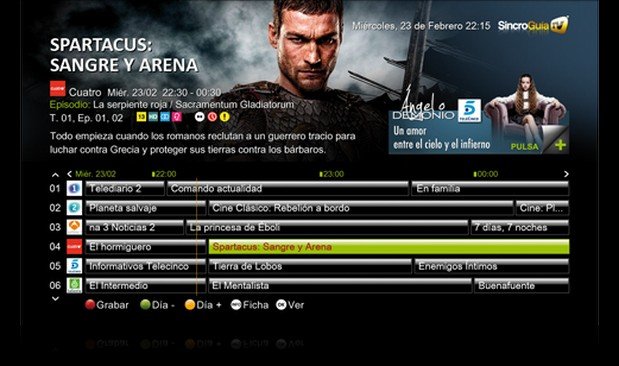
EPG Inout
It is Inout’s personalized channel guide, in which information about each program is shown and we can schedule recordings.
TopTV
Watch YouTube videos, movie trailers, etc.
DTT a la carte
It allows us to select the television programs that we want to watch as if we were browsing through a network’s website, although the catalog they offer is still quite small and is mainly limited to Spanish Television and Channel 9 (let’s see if the rest of the networks get their act together).
Payment method (Premium Syncroguide, 3 euros per month)
Butler TV
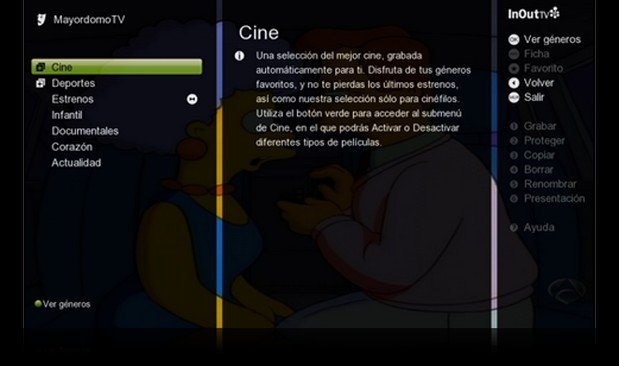 Posiblemente sea una de las cualidades más interesantes del aparato, aunque de primeras nos pueda sonar raro. Es un servicio que, indicándole los gustos personales, graba automáticamente las series, películas o programas que coincidan con nuestros gustos. Por ejemplo, yo tengo especificado para que grabe películas de terror y el otro día echaron a las tantas “Poltergeist”, una película que siempre quise ver. El problema es que si lo dejamos un fin de semana funcionando y tenemos marcada la temática de “Drama”, nuestro disco duro se llenará de telemovies. No estaría mal que en próximas versiones se pudieran afinar un poco más los gustos.
Series recording
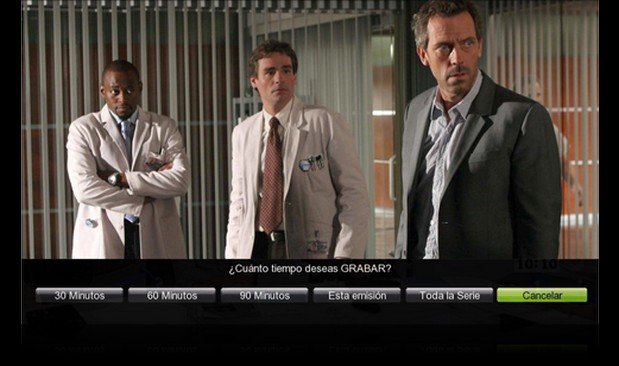 Una de las características que más me gusta, es que si seleccionas que deseas grabar una serie, puedes elegir entre grabar un capítulo unicamente o todos los que se vayan emitiendo. Lo bueno de esto es que da igual el canal o el horario, porque siempre se grabarán.
Schedule recordings from iPhone
It has a very interesting an application for iPhone, which allows you to schedule recordings from your mobile, even if you are not at home.
Others
It also has the Opera browser installed and you can browse the Internet. However, it is not at all convenient since you have to scroll through the links on the screen using the buttons on the remote control, like on mobile phones that do not have a touch screen.
Personal Experience
The InOut Mediacenter 4G HD is a gadget that can be very useful to a large number of users, although each one has their own personal way of watching television or multimedia content that they have downloaded from the Internet. It seems to be slow when scrolling through the menu and accessing its features (some of them because information about series, programs, etc. is downloaded from the Internet) and it has crashed on me a couple of times, but in general it is a very convenient option and I would definitely take it into account when purchasing. I can assure you that the quality of the DTT tuners is superior to that of my television (a 3-year-old Sony Bravia) and that the series I have tried: Game of Thrones and Fringe look and sound great (mkv at 720p).
Price
- Normal mode (189.95 euros): Does not include hard drive, WIFI adapter, or QWERTY remote control (it does come with the normal one)
- QWERTY mode (199.95 euros): Does not include hard drive or WIFI adapter, but does include QWERTY remote control.
- Full Equip Mode (299 euros): Includes 1TB hard drive, WIFI adapter and QWERTY remote control.
Balance
In favor
- Very complete.
- Good quality in the videos and the signal.
- Mediacenter and DTT all in one.
- The Premium service is cheap (3 euros per month)
- Compatible with Windows and Mac
- Local network streaming quality at 720p without quality loss or buffer problems.
Against
- It’s slow
- Infrared control too directional
- Some premium features should be free. (schedule recordings from the iPhone, for example)
Some images in this article have been obtained from XatakaOn. More information about its features and services on InOut’s official website.
Comments are provided by Disqus. When you load them, Disqus may use cookies and process data such as your IP address.
Disqus privacy policy