
 Soy de los que opinan que toda la gente que dice que no le gustan los GPS porque se pierde la magia de “preguntar si te pierdes” o de “que el copiloto te vaya dando indicaciones (con un mapa del tamaño de Cuenca)” son un atajo de mentirosos. Está bien no querer adaptarse a las nuevas tecnologías (allá cada uno) pero cuando se trata de mejorar la experiencia a la hora de conducir, los navegadores han supuesto una mejora significativa a cómo eran las cosas hace 10 años.
I started using GPS navigators about a year ago to go on vacation by car to Salamanca and from that moment on I became a staunch fan of these devices because they provide peace of mind and a guarantee that you are not going to get lost (most of the time) in a place you don’t know that I personally value a lot.
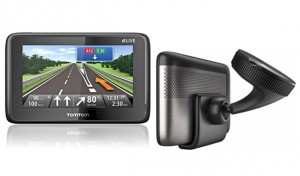
This summer we went to Valencia to the Campus Party and since Tomtom gave us permission to analyze the Tomtom GO Live 1000 we thought there would be no better way to test it than by putting 800Km of travel on it to see where it faltered.
The conclusions are that it is a very complete device, and although it has been around for a while it can continue to be considered a very viable option when purchasing due to the “peculiar” features it has compared to other browsers.
The first thing that catches your attention is its 4.3” screen that allows correct viewing without having to make a lot of effort to see something. Both day and night, raining and sunny, the response of the screen was correct. Unlike older navigators, it has a system for attaching to the windshield by means of a vacuum suction cup, that is, it sticks to the windshield normally and a thread is turned to create a vacuum and make it practically impossible for it to come off. A feature very useful when there are changes in temperatures that cause it to come off.
The navigator has a permanent Internet connection because it has a 3G card to access GO Live services: HD Traffic, speed camera update, weather, speed camera search with Google and QuickGPSFix.
HD Traffic allows you to notify traffic and find out about incidents on your route in real time, indicating traffic jams and possible unforeseen events. It is very useful because it offers you alternative routes in the event that there are delays on your route, which we were able to verify when in Madrid it saved us 15 minutes by avoiding a traffic jam.
QuickPGSFix improves the response time of the browser by connecting to a satellite more than usual, a service that in my opinion should come standard because it is as if the device came standard from the factory if you do not pay an annual fee that GO Live services cost 50 euros (€49.95) although the first year is free.
It can be used as a hands-free system for your mobile phone via Bluetooth, allowing you to hang up and pick up by simply pressing a few buttons that appear on the screen when there is a call.
Its response was quite good throughout the trip except in the streets of Valencia, where it often had a hard time locating our position correctly and it worked with a delay. In this regard, it is curious that it seems that both this and other browsers that I have tried work better in Asturias than elsewhere.
I also found its malfunction in the M-30 tunnel in Madrid a little **incomprehensible. Before entering the tunnel, the signal was received correctly, but when we lost signal and regained it, the Tomtom detected it as if we were in the streets above, making it totally useless. Wouldn’t it be more correct to plot the route in advance before losing signal and estimate it?
The best:
- Very large screen.
- Great precision and speed of response.
- Includes hands-free.
- The touch screen response is good.
The worst:
- Its operation in tunnels and in large cities.
- QuickGPSFix should work apart from the subscription.
Comments are provided by Disqus. When you load them, Disqus may use cookies and process data such as your IP address.
Disqus privacy policy