
[caption id=”attachment_7830” align=”alignright” width=”388” caption=”Gmail using ActiveBox”]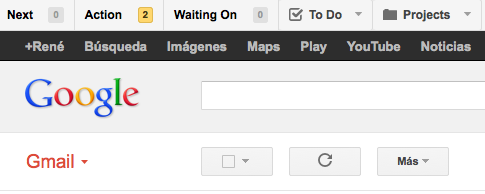 [/caption]
The line between a company’s tasks and communication with customers is very thin. Normally some lead to the others and it is very difficult to organize them using a task manager on the one hand and an email manager on the other. Gmail has the advantage that it is one of the most complete email managers and this is noticeable when it comes to finding solutions to various everyday problems like this one.
The main way to use Gmail as a CRM (Client Relationship Manager) is through labels. We can create a series of default labels:
- Action necessary: Those emails that should not be forgotten until what appears in them is done. For example, if you are pending a domain transfer that does not depend on you.
- Next: Those emails that must be answered as soon as possible.
- On hold: Emails that must be answered by a client/coworker.
Every time we receive an email that corresponds to any of these cases, we will only have to label it and, if we do not wait for a response, we can archive it to keep our email inbox clean. Every time we want to see what we should do, we will only have to directly access the corresponding label, to which we can assign a color depending on its importance (I use: red, orange and yellow.
If it is too burdensome to follow this entire process without any help, there is a great add-on (and with a free version), called ActiveBox that makes the task much easier, adding buttons to Gmail to assign the labels mentioned above automatically and adding other functionalities such as organizing emails into projects.
The good thing about ActiveBox is that it works as a Firefox and Chrome plugin (at the moment it does not have a version for Safari) and the content created with the plugin is not deleted when it is uninstalled because it only modifies the appearance of the page like other extensions like GreaseMonkey do.
The differences between the free version and the paid version ($25 per year) are not too important: add notes to emails, create events in Google Calendar related to emails or establish a “deadline” to some emails/tasks.
I think that for the majority of SMEs using a system as basic as this would already mean a great improvement in productivity, even if it were as a temporary measure until the adoption of a more centralized solution, although it all depends on the needs of each company, obviously.
| Related Link | ActiveIndox Page |
|---|
Comments are provided by Disqus. When you load them, Disqus may use cookies and process data such as your IP address.
Disqus privacy policy