
If you are tired of your Facebook contacts filling your wall with spam, or every time you log in you have invitations to games or messages from dogs that are going to be euthanized, you might be interested in this post.
Facebook has an option that allows you to choose which posts to see from each person, so you can see all of their activity on the social network or just the things that interest you.
Doing it is very simple although it is not easy to find. To do this, we will enter the person’s profile and click on the “Friends” button, which is above the header, on the right side.
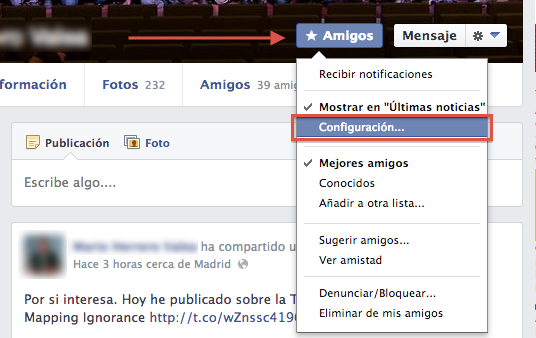
If we click on “Settings…” under “Show in Latest News” a new drop-down menu will open in which we can configure which posts from our Facebook friends we want to see.
There are three groups:
- All updates
- Most updates
- Only the important things.
In most cases, it is enough to check “Only what is important”, but at the bottom we can customize the options even further by choosing what type of content we are willing to see: Important events, status updates, Games, Photos, etc.
If Facebook didn’t have this option, I probably would have stopped using it a long time ago, or I would have deleted half of my contacts. :)
Comments are provided by Disqus. When you load them, Disqus may use cookies and process data such as your IP address.
Disqus privacy policy