
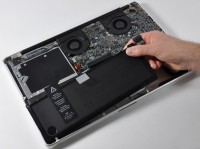
 Hoy en día sería muy raro encontrar a una persona que no haya utilizado o utilice algún producto electrónico con batería. Desde un móvil a un ordenador portátil, prácticamente todo tiene batería. Sin embargo, estoy seguro de que ocurriría lo contrario si preguntásemos a alguien cómo se debe tratar a una batería para que resista el paso del tiempo lo mejor posible. A continuación os dejo con 19 consejos a tener en cuenta para alargar lo máximo posible la vida de una batería.
1. Defrag regularly
Regularly defragmenting disks allows you to more efficiently organize hard drive sectors and, therefore, allows the hard drive to work less when data is accessed. As the work of the hard drive is less, the battery will last longer, and although the results would be negligible, it is important to maintain the hard drives in an efficient manner.
2. ‘Kill’ useless processes
Ends non-vital processes. To do this, enter the task manager by pressing ‘Ctrl-Alt-Del’. If you are not on the internet, it is safe to eliminate some processes that will not be vital to us in the short term, such as the antivirus and the firewall. You can also manage the programs that run at the start of the computer through ‘Run -> msconfig’ and then selecting the ‘Startup’ tab. There you can deselect programs that do not run when the computer starts.
3. Pause scheduled tasks
Deactivating or pausing some tasks such as defragmentation or antivirus scans can be a good measure to increase the life of our battery in a time of trouble when we need longer battery life. This advice is short-term advice that should only be done on rare occasions.
4. Disconnect external devices
USB devices are the biggest battery consumers. By disconnecting all external devices, such as mice, Wi-Fi, external speakers, Bluetooth, iPods or USB sticks, we will be able to increase battery life.
5. Empty CD/DVD drives
Even if you don’t use them, when you leave a CD/DVD inside the drive, it will read it from time to time with the consequent battery consumption.
Being more radical, we could give up using any type of DVD drive or external storage devices while depending on a battery. You can use virtual hard drives or CD/DVD drive emulators.
6. Lower the brightness
The power consumption of LCD screens is one of the elements that consume the most energy in a laptop. Calibrating the brightness value to the minimum values we can will greatly increase the life of our battery.
7. Turn off the sound
Mute the sound and try to avoid using multimedia content, such as videos or music, to maximize battery life.
8. Don’t use screensavers
Instead of activating the screensaver, when we are not using the computer it is better to turn off the screen.
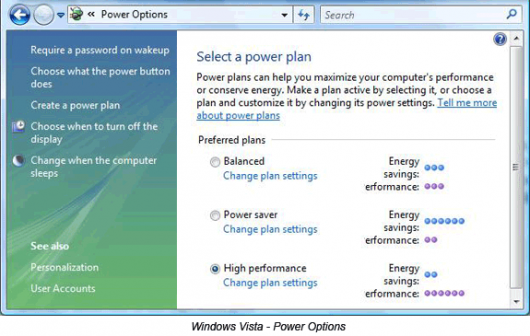
9. Customize power options
Familiarize yourself with the power options of the ‘Control Panel’. Both XP and Vista have highly customizable power managers that allow you to deactivate some components such as the monitor or hard drives after a certain period of time without using them. Changes can also be made using predefined templates, such as ‘Balanced’, ‘Economy’ or ‘High Performance’.
10. Disable the visual effects
One of the main features of Windows Vista is that it comes with an interface called ‘Aero’, which has many cool visual effects, but also consumes power through the graphics card like a champ. You can disable this interface and put the basic Windows one by changing the visual theme in Control Panel -> Personalization -> Theme and choosing ‘Classic Windows’.
Linux and Mac OS are much better optimized so that the interface consumes less power :)
11. Hibernate is better than suspend
When a computer is suspended, the hard drives and display are disabled. However, the memory remains active while the CPU slows down, which affects the battery. However, when the computer goes into hibernation, it saves its current state and turns off completely, thus saving power.
12. Work with few programs
Working with many programs, the computer will consume more memory and therefore, more energy. Some graphic applications such as Photoshop and Gimp make the CPU work excessively, so we must be especially careful with these types of applications, as well as with games or video editing programs. The ideal is to have the fewest possible number of applications running.
13. More RAM is better
Having a sufficient amount of RAM allows for fewer accesses to virtual memory. Virtual memory, residing on the hard drive, forces the system to access it, which causes considerable energy consumption. Therefore, it is advisable not to ignore the amount of RAM in our computer.
14. Cleanliness also matters.
A computer with blocked fans will generate more heat and reduce its battery life. Cleaning the fans regularly will keep their temperature lower. Additionally, having it in a spacious place where air can flow is also advisable.
15. Temperature is a silent killer
Computers are not usually prepared for high temperatures, so it is advisable to avoid direct exposure to the sun or leave it inside a car in summer. The battery will degrade little by little.
16. Avoid the memory effect
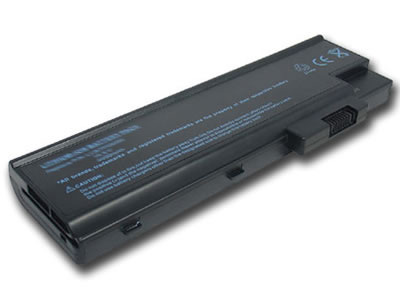
The old Ni-MH batteries lost charge capacity each time they were recharged. However, this does not happen in current Li-Ion batteries. The memory effect occurred every time a battery was recharged without being completely discharged, so it could be prevented by using it completely before charging it again.
The opposite happens with Li-Ion batteries, it is not advisable to completely discharge them and then charge them again.
17. Update software and drivers
Some programs and drivers are updated to improve their efficiency, which can affect the battery (for example, if their disk access is optimized).
18. Use an appropriate charger
Make sure you use an original charger or it meets the manufacturer’s specifications. It could be the case that you are using a charger ‘made in China’ that is at the wrong voltage or that has a manufacturing defect.
19. Save it if you are not going to use it
If you are not going to use the laptop battery for a while, make sure the charge is close to 40%, remove it and store it in a cold place.
A normal Lithium Ion battery has an average life of 2 or 3 years, but with a little care its mortality can be delayed. Do you know of any other methods to preserve the life of a battery?
Translated from Make Use Of (20 Ways To Increase Laptop’s Battery Life)
Comments are provided by Disqus. When you load them, Disqus may use cookies and process data such as your IP address.
Disqus privacy policy