
Wordpress is not a bad content manager, in fact it is possibly one of the best in terms of ease of use, ease of installation and features. However, it has a problem that can be an ordeal for those blogs that have a fairly high volume of visits (more than 10,000).
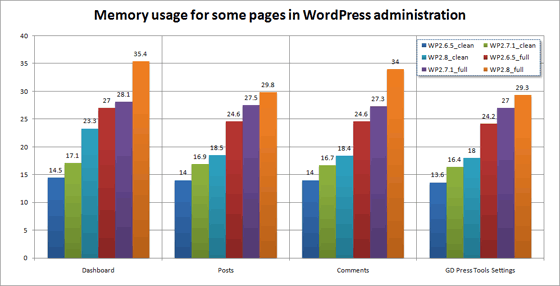
It is evident that the more plugins we have running, the greater the memory consumption of each request to the blog (consumption of the process that is started on the server every time someone enters our site). The latest versions of Wordpress have a base consumption of 8MBs per request, which with the activation of plugins can increase to 17Mbs.
How does memory consumption affect your blog?
As I say, an installation of Wordpress, along with an abundant number of plugins can consume about 17MBs of RAM. This consumption in small blogs may not seem important to us, but if we have a blog with many visits, if the entry frequency is very high, it could cause it to work slowly or even cause us to throw it away.
For example, if our server has 512MB of RAM and each request consumes 17MBs, it would only take 30 simultaneous visits to reach the physical limit of the server (ignoring, of course, the consumption of the rest of the applications and features of the server, so the number would actually be much lower).
How do I measure memory consumption?
There are many alternatives to measure the memory consumption of the blog, but I am going to focus on the 3 that I have used in this blog.
Bareback.
It consists of placing a function in PHP at the end of our blog that will indicate the memory consumption of our request every time we reload the page. This function I found in Emezeta ( I’m going to start calling Sigt-Anieto2k-Emezeta the “php” axis) and is the following (only for PHP 5.x)
echo 'Memoria usada: ' . round(memory_get_usage() / 1024,1) . ' KB de ' . round(memory_get_usage(1) / 1024,1) . ' KB'Once this is done, it would be enough to reload the page and activate and deactivate the plugins that we want to consult to know how much memory each one consumes (doing additions and subtractions, I think everyone knows :) )
TPC Memory Usage
 Es un plugin de Wordpress que realiza prácticamente la misma función que el método arriba mencionado, pero podemos acceder a él desde el panel de administración del blog y ver la información de manera más limpia. Además, también proporciona otra información de Worpess, de PHP y del servidor. Para consultar el consumo de memoria de una petición concreta, tenemos que ver el código de la página y antes del cierre del body saldrá comentada.
| Download | TPC Memory Usage |
|---|
WPTuner
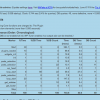 Este plugin añade unas estadísticas sobre las consultas SQL y el tiempo de carga de cada elemento de la página al final de la misma. Lo positivo es que es altamente configurable según la información que queramos obtener. Además, nos indica cuáles son los plugins activos que tienen un tiempo de carga más alto o si el problema está en nuestro theme/plantilla.
| Download | WP Tuner |
|---|
I hope you find it useful in optimizing Wordpress on your server. It would be very interesting if you were writing how much memory the requests consume in your blogs to do an analysis of what the “normal” and “exceptional” data are.
Comments are provided by Disqus. When you load them, Disqus may use cookies and process data such as your IP address.
Disqus privacy policy