
 Como usuario de Spotify y de un iPhone 2G, el sistema operativo se me ha quedado estancado en la versión 3.1.3, por lo que no puedo disfrutar de muchas de las caracteristicas que se han implementado en las ultimas versiones del iOS. Algo parecido ocurre con el iPad, que hasta Octubre no tendrá actualización al iOS 4.
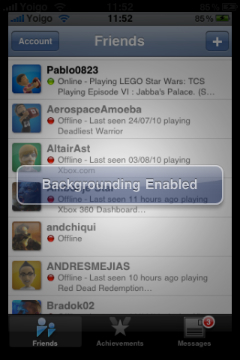
Luckily, thanks to this utility called jailbreak you can obtain similar results (within the distance), installing an application from Cydia called Backgrounder to provide the coveted background. Its operation is very simple: just hold down the Home key to exit an application so that it stays in the background and hold it again to remove it. It can also be configured so that the way an application is put in the background is different.
It is very likely that by leaving an application in the background, we will forget about it and leave it there, with the consequent battery consumption, which is why I use it in conjunction with SBSettings, which has an option to list all the running processes and kill the ones we want quickly. Furthermore, since it also allows you to hide icons, I have chosen to hide the Backgrounder one so that if I leave the iPhone with someone they will not change the settings.
It is a solution that works, but it is far from perfect because you have to be careful and not leave more than one or two applications in the background because the system becomes unstable. Of course, we can now do things like leave Spotify in the background while we do other things, which is already appreciated.
Comments are provided by Disqus. When you load them, Disqus may use cookies and process data such as your IP address.
Disqus privacy policy