
 Actualmente, cuando se piensa en seguridad informática, lo primero nos viene a la cabeza sea el robo de cuentas y contraseñas, porque en estos momentos es la forma más común de identificarnos en los sitios. Ahora que los servicios en la nube a través del famoso “Cloud Computing” se están popularizando, resulta muy importante la seguridad, puesto que cada vez más, nuestros archivos están almacenados en servidores ajenos a nosotros.
Unfortunately for us, there is still no totally secure way to protect our data on the Internet.
Maybe right now you are thinking about your Facebook photos or your personal information on other social networks, but you have much more information than that on the Internet, even if you are not aware. Have you ever thought about what would happen if one day your email account was stolen or if all the data stored in it were deleted? At least for me, that would be catastrophic.
One of the main problems of having to remember our users and passwords is that our memory is not infallible, much less infinite, so although one of the main recommendations of professionals in the sector is to use a different password for each page in which we register and that these are difficult to remember (nothing about the name of your dog or the date on which you bought your first console), in most cases it is impossible. Mnemonic patterns can be used, although we increasingly register on more social networks and more pages and it becomes unsustainable.
Of course, not all responsibility falls on our side. System administrators with private information must also be careful with the data stored on their servers, otherwise a disaster of epic proportions can occur.
Chaos Theory
 Debemos tener cuidado con las empresas que almacenan nuestra información porque también pueden cometer errores e incluso pueden llegar a perder toda nuestra información.
A few days ago, a hacker broke the security of Playstation Network, stealing the information of more than 70 million users, including personal and banking data.
Another recent case of catastrophic consequences is that Google accidentally deleted the Gmail accounts of 150 thousand users and most of their data could not be recovered.
To make matters worse, also a few days ago, Amazon S2, the Amazon processing service used by many web companies, went down for a few days without the slightest explanation to its customers, causing them to lose money.
If we connect from time to time to open WiFi networks (without a password, like that innocent neighbor we all have), we can be victims of another security problem that we may not be aware of: that all the information that is transmitted can be obtained without being encrypted.
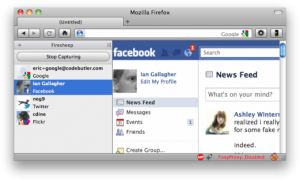 Firesheep es un plugin de Firefox que permite “esnifar” los paquetes que se transmiten a través de la red wifi a la que estamos conectados si esta es abierta y obtener los datos de y contraseñas de las páginas en las que entre la gente que se conecte a la misma red, lo que quiere decir que te puede robar tranquilamente tu usuario y tu contraseña de prácticamente cualquier servicio que no utilice encriptación SSL (y de algunos que solo utilizan esta encriptación para el login, pero no una vez estás dentro del sitio).
Am I sure? And my data?
It is very difficult to know if we are really safe because it is a job that begins the first day we use the Internet. Starting from the fact that it is completely impossible to remember each and every one of the pages on which we register, the information we share on each one, or ensure 100% that the security and reliability measures of the company that stores said information, the answer is no. And since neither machines nor people are perfect, the answer will probably never be positive.
Don’t panic!
Luckily for us, the non-existent perfection of the victims is linked to the non-existent perfection of the attackers, because they are not perfect either. Therefore, there are many ways to prevent ourselves from information theft or data loss, and they all go through the same place: common sense.
We are going to look at a few solutions to security problems and to guarantee that in 90% of the cases, our data will be safe (the other 10% is the inevitable “bad luck”).
Solutions: Passwords
Google 2-Step Verification
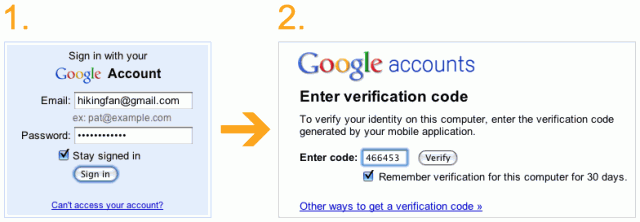 Google 2-Step Verification es un sistema proporcionado por Google que añade una capa de seguridad más a nuestra cuenta de Google. Su funcionamiento consiste en que tras introducir nuestro usuario y contraseña al hacer login, se nos pedirá además un código numérico. Para obtener este código numérico, debemos haber asociado un número de teléfono a nuestra cuenta de Google, y haber descargado en él la aplicación “Google Autenticathor”. Esta aplicación, generará códigos para hacer login y solo los tendremos nosotros.
In this way, it is almost impossible for our Google account to be stolen, since to enter it, in addition to our username and password, we would need to have our mobile phone.
1Password
 Como comentaba antes, una de las recomendaciones principales para proteger nuestras cuentas es la de tener una contraseña distinta en cada servicio, pero resulta muy difícil hacerlo porque nuestra memoria no es infinita.
For this there are programs like 1Password, which is available for Windows, Mac, iPhone and Android. This program generates strong passwords and stores them so that you do not need to remember them. Simply set a master password to access the app and that’s it.
In addition, it can be used together with Dropbox to have passwords available wherever we go.
Solutions: privacy
####VPN
When we connect to an open WiFi network from our computer or mobile phone, it is very easy for private information to be stolen because the data transmitted by it is not encrypted. To avoid the eyes of unwanted people, you can use a VPN network to access the internet. What these services allow is that when connecting through them, our information remains hidden, because from the outside, all connections will be made through the VPN server and with this we prevent information from being stolen.
TOR
 Tor es un sistema de enrutación compuesto por un cliente que se instala en nuestro ordenador y un sistema compuesto por routers situados a lo largo de todo el mundo. Los datos que transmitimos a lo largo de Internet van encriptados por la red de routers de Tor, lo que permite que tanto nuestra localización e información personal permanezca oculta.
However, you must be careful with its use, since although the information within the Tor routing network remains encrypted, until this information reaches the Tor network and when it leaves it, it is not encrypted by default and can be stolen. To avoid this, it is advisable to use HTTPS connections.
Solutions: Storage
Local storage of our documents
 Aunque pueda parecer anticuado, una de las soluciones que mayor seguridad nos puede aportar para almacenar nuestros documentos es hacerlo localmente, es decir, en nuestro propio disco duro, ya sea bien externo o interno.
Current operating systems, such as Windows 7 or Mac OS X, already include standard tools to make backup copies of our information. The first from the system tools and the second through Time Machine.
The advantages of using local copies is that we will not depend on any company and that the information “will stay with us.”
Cloud Storage
 Actualmente existen numerosos servicios que permiten almacenar nuestros archivos en la nube, es decir, en servidores alojados en Internet, permitiéndonos acceder a nuestros documentos desde cualquier parte.
Some of the best-known services that offer us cloud storage are Google Docs (to store documents) or Dropbox and SugarSync (To store all types of files).
In this section, although they are not storage services, we could include webmail services, such as Hotmail or Gmail, since all our emails and even our contacts can be stored there.
The hybrid model
The best possible storage solution is to use the two alternatives mentioned above together: local and in the cloud, since if one fails, we will always have the other as a backup. This means that even if we consider that our emails are safe in Gmail or that Dropbox is totally reliable, an error can always occur that causes everything to go to hell.
Conclusions
Cautious man is worth two
The best advice I can give from this document is that above all we must be aware that our information can be lost or corrupted and what would happen if that happened. Taking that into account, it is the task of each person to assess what actions they must carry out.
Only a few solutions are presented in this document, but there are many more and even more will appear over time, so it is advisable to be a little up to date with them.
Comments are provided by Disqus. When you load them, Disqus may use cookies and process data such as your IP address.
Disqus privacy policy