
 He estado un buen rato buscando la manera de grabar el audio del ordenador, y he encontrado una manera gratuita y totalmente sencilla de hacerlo, gracias a Audacity.
Surely many of you will already know Audacity, a benchmark in audio editing programs, free, with GNU license and compatible with all operating systems (Windows, Mac and Linux).
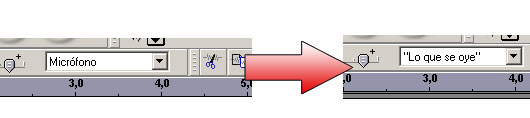
To capture the sound of our own computer, just download Audacity and run it. Once we are inside the program, and we have the main window in front of us, we will select the sound source we want in the drop-down menu on the right. In this case, we are interested in recording the sound that we hear through the speakers, that is, “what is heard”, so we select this option.
Once the option is checked, all you have to do is click on the recording button (circle) on the top interface to start recording the sound. When we want to stop the recording, we will press the stop button (square) and we will export the result to mp3 or wav, as we want (File -> Export as mp3…).
Do you know any other way to record computer sound?