
 Ya hace algún tiempo que tengo la Wii, pero no fue hasta hace unos días cuando decidí empezar a sacarle provecho de verdad con emuladores, programas para ver películas, etc.
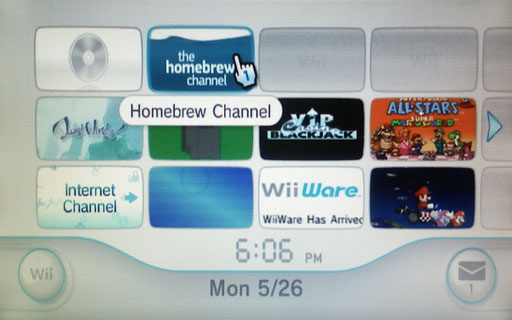
To do this, you have to use the so-called Twilight Hack, which allows you to take advantage of a programming error in the Zelda Twilight Princess to access memory areas of the console and thus be able to write our code in them (if C pointers are not used correctly… :P) and install the Homebrew Channel.
There are two different ways to do it, one for those who have the console with a chip and another for those who do not. I am going to focus on the one for those who do not have it with a chip, since it is the one I have done.
Necessary Materials
- A Wii
- An SD card and its corresponding card reader.
- A computer.
- An Original Zelda Twilight Princess game
- Twilight Hack (It is a Zelda save game that takes advantage of the aforementioned vulnerability. It can be downloaded from the official website).
- HomeBrew Channel (Must be downloaded from the previous link)
Save Our original game of Zelda: TP.
First of all, we must save our Zelda: TP game on our computer so as not to lose it. Of course, it is an optional step and we will only do it if we are interested.
To save the game on the computer, we must insert the SD card into the Wii and go to the Data Management menu of the console. Once there, we will choose the Zelda game and copy it to the SD card, and from there to the computer. Next we will delete the Zelda saved game from the console.
Prepare the Files on our SD Card
At this point, we should have already downloaded the Twilight Hack and the Homebrew Channel. So what we will do is copy some of these files to our SD card. Specifically, we are interested in two:
- Twilight Hack: File data.bin, which we must place in the path ‘/private/wii/title/RZDP’ on our SD card. It is important to make it clear that RZDP is for the PAL version, while RZDJ is for the Japanese version and RZDE for the American version, so we must choose the one found in the region folder of our console.
- Hombrew Channel: File boot.dol. We must place it at the root of our SD card (’/’).
Install the Homebrew Channel by applying the Twilight Hack
At this point we will be ready to install the Homebrew Channel on the Wii. To do this, we will insert the SD card into the console and copy the Twilight Hack from the SD card to the console memory (We will enter the SD card memory and choose to copy).
Then we insert the Zelda Twilight Princess DVD and start the game normally. Once in the game selection menu, we will choose the top one (the only one that has something) and we will start playing. Once in the game, we will talk to the individual in front of us and that will be when the hack code begins to execute.
Numbers and letters will appear on the screen, and we will also be asked repeatedly if we are sure of what we want to do. We answer yes by pressing the buttons requested and after a few seconds the console will restart showing the new Homebrew Channel.
Congratulations, you can now load Homebrew with your Wii.
Comments are provided by Disqus. When you load them, Disqus may use cookies and process data such as your IP address.
Disqus privacy policy