
 eMule es uno de los principales programas para descargar archivos antiguos hoy en día, por lo que será mucho más fácil encontrar en él películas antiguas, música rara o juegos retro que en otros sistemas, como Bittorrent o Descarga Directa. Hoy comenzamos un manual sobre el eMule que estará formado por tres partes que iremos publicando los próximos días.
The main problem that arises when downloading eMule is knowing where to do it from. eMule is a free program for which you will not have to pay a dime, so if when installing it it informs you that you have to send an SMS to unlock it, do not do it because it is a scam.
So how do I download eMule?
[caption id=”attachment_3584” align=”aligncenter” width=”440” caption=”The address of the official eMule website”]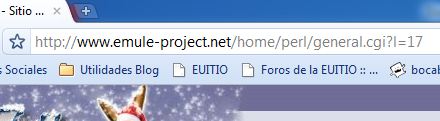 [/caption]
To download eMule you must enter the official program page: https://www.emule-project.net. Make sure that the correct URL (name given to web page addresses on the Internet) appears in the address bar.
Next you will have to go to the “Download” section, which is located on the left side of the page and a page will appear to download the latest version of eMule. Normally there are 3 options: Installer, Binary Files and Source Code. What interests us is the Installer, so we will click on “Download” just below it.
[caption id=”attachment_3583” align=”aligncenter” width=”428” caption=”We will download the installer of the latest version”] [/caption]
Once clicked, another page will open and the download of the eMule installer will begin, which will be saved in the folder that we have configured for downloads in our browser (if we have clicked on “Save as…”, if we have selected “Open”, it will not download it, it will open it automatically). This folder, in the latest versions of Firefox, Internet Explorer, and Google Chrome, is usually called “Downloads” and is located in “My Documents.”
When we open the installer by double clicking on it, an installation wizard will appear in which we will only have to press next until the end (it is advisable to read what it says) taking care that the options we choose fit our needs.
Once this is done, we will have eMule installed.
Comments are provided by Disqus. When you load them, Disqus may use cookies and process data such as your IP address.
Disqus privacy policy