
 Myspyspot es una herramienta que permite vigilar tus marcas en la red. Con Myspyspot puedes seleccionar unos determinados parámetros de seguimiento para comprobar lo que se habla de tu marca o empresa en Internet, basándose en los principales motores de búsqueda actuales: Google para un análisis típico del posicionamiento y Twitter para realizar trackings en tiempo real de tu marca.
If you have a company, but you are not used to the Internet world, surely the previous paragraph will sound very good to you, but you will have no idea how to start this application, so I am going to offer you a small tutorial to use the tool, which can also be very interesting for bloggers and webmasters who want to analyze their positioning on the Internet.
Register on Myspyspot
 Para utilizar Myspypot lo primero que deberemos hacer es registrarnos. Actualmente la herramienta cuenta con una versión trial de prueba totalmente gratuita que permite realizar análisis básicos y comparativos entre Google y Twitter. Para ello, entraremos en la página de Myspyspot y haremos clic en el botón que pone “Trial” a la derecha de la página o donde pone “Utiliza Myspyspot” en la parte superior.
Once there, we will have to enter our data to use the tool, but as I said above, it is a free version and therefore you do not have to enter any type of bank information.
After registering, we will receive an email in our email and when we open it we can start using the application.
How to Use Myspyspot
Upon entering the administration panel we will see that we have two different parts, in the left sidebar we will manage the clients of our tool and also the brands that we want to track and in the central part we will have all the information related to said monitoring
Managing Clients
[caption id=”attachment_4207” align=”alignright” width=”221” caption=”Customer and Brand Management in Myspyspot”]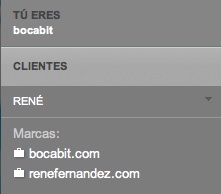 [/caption]
Myspyspot allows our clients access to view their tracking, although in a way that is more friendly to the low/medium user in which not as much information appears. Therefore, an account can be created for the client and their access can be allowed through a section of the tool intended for this purpose.
Managing Brands
The monitoring with Myspyspot in a simple way of a brand in a simple way is its strong point, and that is why it is important to have a clear interface in which all the important information can be seen at a glance. Taking this into account, in this section we can create and edit the brands that we decide to monitor.
To manage a brand we can configure the following parameters:
- Brand Data: Information related to our brand, such as name, website, Twitter username and geographic restrictions.
- Search Concepts: The phrases that will be analyzed in search engines.
- Key Terms: The terms for which the brand must be well positioned.
- Competitor Brands: Data from our competition to make comparisons.
The Central Information Panel
This is where all the Myspyspot monitoring information appears. This Information is grouped into the 5 tabs shown below.
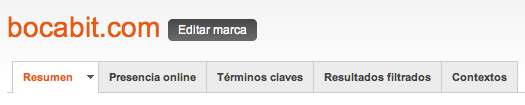
Summary
An overview of all the information will appear here.
Online Presence
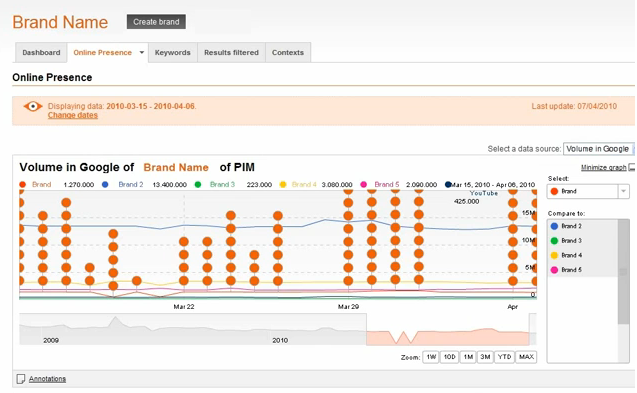
It will be the section from which the brand’s monitored information will be analyzed and compared with the competitors we have selected. You can choose the dates to analyze and also the source of analysis (For example Google). In addition, annotations of the different data can be made.
The combined information will appear in the form of a graph that is quite reminiscent of Analitycs, but at the bottom of the page the individual information for each brand will appear.
Key Terms
This tab will show the search engine positions of the terms that we have selected to monitor in the campaign options. As in the previous section, the results are displayed in the form of a graph according to the position of the term over time.
Filtered Results
In this section you can filter the results of the search terms.
Contexts
This tab is quite interesting, since it allows you to analyze what is said about our company in each medium independently. Multiple RSS addresses can be entered to follow on Twitter, in the media or on a specific brand blog.
Conclusions
Myspyspot is a very interesting tool, which although it is mainly intended for companies, marketing agencies and public administrations, can be used perfectly in other areas. The information it can provide is useful, but you still need to polish some functionality, such as increasing the information update rate to, for example, twice a day and also once when you create a brand; and it should also notify users of when the next update will be made, not just when the last one has been made. (Because it is a bit disconcerting to start using it and not see any data)
In addition, we must bear in mind that it was made in Asturias, which is still a merit ;) and that it is still a trial version.
| Tool Page | Myspyspot (#FIMPiPad) |
|---|
You have this information also in English :)
Comments are provided by Disqus. When you load them, Disqus may use cookies and process data such as your IP address.
Disqus privacy policy