
I’ve been testing OS It is clear that this time Apple has decided to take a step towards the fusion between iOS and OS X, but it seems that along the way they have forgotten such important elements as usability or functionality.
To begin with, it is totally incomprehensible that they have removed the SMB protocol for file sharing. Now my Mac is less functional because I can’t access the computer from any of my media centers, which was completely functional until the update. Before it was a pleasure to download a series and watch it directly on the TV without having to move files from one place to another, now I have to carry a hard drive from the computer to the TV and from the TV to the living room.
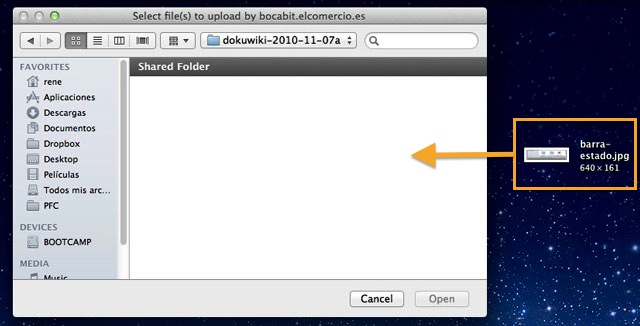
The second mistake is possibly a feature that many people did not use, but that you can try if you have Snow Leopard installed (Because if I talk to you about Drag & Drop to the Finder uploader it sounds Chinese to you). Imagine that you want to upload a photo to Facebook, Tuenti, or save a file in a specific location. Until now you had two options: the first was to navigate to the location of the file and select it from there (a classic) but there was also the possibility of dragging the file to the window and it was automatically selected to be uploaded, something that was extremely productive for me when I wanted to upload something from my private storage: the desktop. On Windows, doing the same thing moved the file location, so I considered OS X better than Windows in this regard.

Another mistake I consider is that the status bar is not displayed by default (again in Finder), which indicates the space occupied by the files in the folder in which we are located and which in the icon display mode allows its size to be varied. Being minimalist is appreciated, but as long as it does not impact the user experience (making it worse) or removing functionalities. I also don’t like that the scroll bars are not visible, because they can lead to confusion on certain websites (for example, on Google+) since you cannot see if you can scroll or not (white background on white list).
Perhaps talking about reverse scrolling is left out of this article because perhaps it is a change for the better, but after years of using computers I do not dare to change it to maintain my productivity and so that every time I leave the computer to someone who uses Windows they do not go crazy. Maybe the new generations will look at us strangely in a few years because “we controlled the mouse backwards”, that is if they continue using a mouse…
Many of the new features related to multi-touch gestures look great on a laptop, but on a desktop (keyboard + Magic Mouse) things change: you neither need more than one space nor do you use gestures beyond clicking on the mouse with different fingers because it is uncomfortable. With this I don’t mean that it is the panacea in laptops (which it isn’t), because you end up with a “mental mess” of using two fingers on one side, three on the other, doing the bird like Fernando Alonso every time you want to show the desktop… and without the possibility of customization.
I have updated 2 of the 3 computers to which I have access to Lion, the third is the work one and for now it remains as it is. I do not consider that any of the new features of the Apple operating system represent such a notable improvement as to sacrifice my productivity. There Snow Leopard stays.
Updated (08-29-2011): I just discovered that the “Drag & Drop” feature is operational but only when we have the Finder in a column window. I don’t know what it would have cost them to implement it for all views, but hey, it’s something.
Comments are provided by Disqus. When you load them, Disqus may use cookies and process data such as your IP address.
Disqus privacy policy