
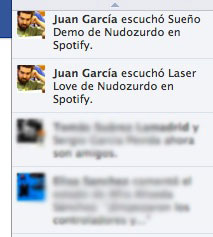
 Desde la última actuzalización de Facebook y Spotify, las canciones que escuchas se van publicando automáticamente en la actividad reciente de tu perfil de Facebook y además se muestran en tiempo real en la barra lateral de la derecha como si hubiéramos vuelto a los tiempos en los que poníamos la canción que estábamos escuchando en el Messenger.
The steps to follow to deactivate this publication are simple, but they can lead to confusion because in my opinion it is not at all clear that “that” is precisely the option you want to deactivate.
We have to go to the Spotify preferences window and go down to the “Facebook” section.

Once there, we will deactivate the box “Get personalized recommendations by sending the music you play to Facebook’s Open Graph” (very clear, hey).
Don’t try to manage the songs you send to Facebook through the social network’s application privacy panel, because if you disable some of the features, Spotify will ask you to reconnect your account.
Updated: After the latest Spotify update, the option is a little more “usable”. 
Comments are provided by Disqus. When you load them, Disqus may use cookies and process data such as your IP address.
Disqus privacy policy