
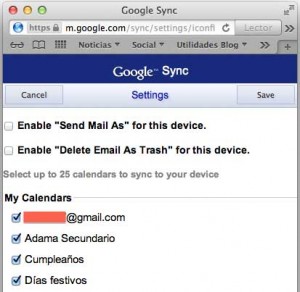
 Si tienes más de un calendario creado en Google Calendar y deseas utilizarlo en el iPhone o en el iPad, verás que no basta con introducir los datos de tu cuenta de Google dentro de las preferencias del sistema.
This is because when you add a calendar in Google Calendar, it is a “delegate” that will remain hidden until you indicate the devices on which it can appear.
For our delegated calendars to appear on our iPhone/iPad, we must enter the following URL from our iOS device (or by setting our browser’s user agent to iOS).
Once there, all the devices on which we have entered our Google account will appear. If we click on one of them, our calendars will appear and we can mark the ones we want to be shown, including any shared calendars we have.
I don’t really understand the reasons why all this has to be done because it seems quite confusing for the average user, but it has been working since the iPhone existed and there is no sign of changing it in the short term.
Comments are provided by Disqus. When you load them, Disqus may use cookies and process data such as your IP address.
Disqus privacy policy