
When we launch an iPhone everything goes like a shot. The apps run smoothly and open at lightning speed. However, little by little we are noticing how everything is going slower and when a friend buys a new iPhone we confirm our suspicions: everything is going like a shot for him and things are going slowly for us. Because?
The obsolescence of iPhones occurs due to two factors: hardware and software. The most obvious, the hardware one, is that every year Apple introduces one or two new iPhone models, more powerful than previous versions. Being more powerful, it is logical that the apps in them work more fluidly and everything seems faster.
However, the second reason is less obvious even though it is usually the one that causes the most wear and tear on mobile phones: updates.
Let’s imagine for a moment that we are a development company that has an app in the Appstore. As we are interested in reaching the largest possible audience, we will make our application compatible with the most used iOS version but also with the most used iPhone at that time. This means that its performance will be optimized for a certain hardware and will work slower in previous versions (for example, if now the iPhone that has the most people is the iPhone 5, companies will develop for iPhone 5, so it is likely that the performance on a lower iPhone (4S, 4, 3GS…) will be lower.
[caption id=”attachment_9725” align=”aligncenter” width=”618”]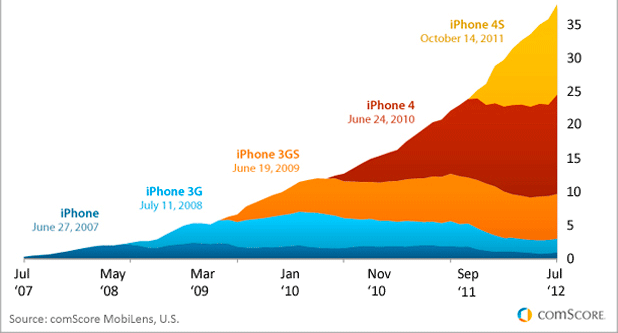 iPhone users according to their model (2012)[/caption]
When Apple releases a new mobile phone, the decrease in performance will not be noticed instantly because first it is necessary for that mobile phone to obtain a sufficient market share to make it profitable to develop for it, but surely in a year this decrease will begin to be noticed.
What can I do to delay the obsolescence of my iPhone?
To be honest, rather little. One way or another, the mobile phone will become obsolete, but we can ensure that its performance is not so affected.
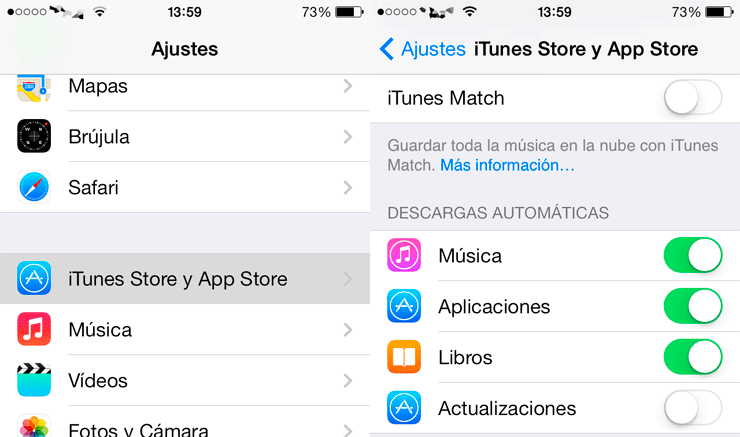
Disable automatic updates
The appearance of application stores has brought with it the obsession of always keeping our applications updated. Do we really need to update them? Many updates simply fix bugs while others add functionality that we will never use.
By having automatic updates activated we are losing control over what is installed on our phone and we will be passively favoring software obsolescence.
Automatic updates can be disabled from “Settings”.
Store old versions of apps
It is a useful measure to be able to restore the apps on our iPhone to how they were at a certain time so that their performance returns to what it was then.
To carry out this task we must connect our iPhone to the computer, run iTunes and download all our applications. Once this is done, we will access the folder in which they are saved and copy/move them to a directory that is under our control to restore them later.
Store shsh blobs to roll back to a previous version of iOS
Users who updated their iPhone 4 to iOS7 will agree with me on this point. Every time iOS is updated, the possibility of downgrading to a previous version is lost. It doesn’t matter that the performance is much worse with the new version, you simply can’t because Apple doesn’t allow it.
For this task there is TinyUmbrella, which obtains these files from Apple and Cydia and saves them on your computer. I already wrote a while ago about how to do it and even though the program has been improving, the process has not changed.
Comments are provided by Disqus. When you load them, Disqus may use cookies and process data such as your IP address.
Disqus privacy policy